

Imagine. Explore. Create.
Tūranga
Whether you're taking your first creative step, building on existing skills, or reigniting a passion, Pua welcomes you. Explore the equipment, technologies and creative opportunities available across Christchurch City Libraries and discover where your ideas can take you.

No bookings needed — just bring your curiosity and bring your ideas to life.
Our welcoming environment invites you to:
- Experiment with state-of-the-art digital tools at your own pace
- Connect with our knowledgeable team for project guidance and inspiration
- Uncover creative possibilities you never imagined were within reach
Drop in during our open hours
Events
Acrylic Bender
Our acrylic bender is a versatile tool designed for shaping and forming thermoplastic sheet materials. It allows creators to produce clean, precise bends in acrylic, making it ideal for signage, display stands, enclosures, craft projects, and custom fabrication.

Craft Cutter
A Cameo 4 cutter contains a very sharp blade that is controlled by a computer. The blade can move precisely to cut shapes out of materials such as paper, card, adhesive vinyl, heat transfer vinyl, sticker paper, or sublimation paper / invisible ink paper.
There is a Silhouette Cameo 4 desktop cutting machine at Tūranga.

Embroidery Machines
Construct your own projects and embellish with stitched designs using the embroidery machine.

Heat Press
A heat press is a large type commercial iron. It has controls for pre-set temperature, time and pressure, making it ideal for the application of heat transfer vinyl to fabric, garments (such as T-shirts) and other media.
There is a Cugi heat press at Tūranga.

Laser Cutting
A laser cutter provides a fast and accurate way of cutting a variety of materials, such as paper, card, acrylic, wood, laminate and fabric.
We are no longer cutting MDF on our laser cutters. MDF contains synthetic formaldehyde. Laser cutting this material produces toxic dust and fumes which are harmful to people and the health of the machine. Supplying your own materials? For a list of approved materials for laser cutting please ask a member of our creative team.
There is a Thunder Laser Nova-35 80W CO2 Laser at Tūranga.

Media conversion
Our media conversion station can be used to create a high-quality digital copy of a variety of media. Tūranga has two Epson Perfection V600 scanners that can scan a variety of physical media formats to digital files.

Sewing machines and overlockers
Construct your own projects from fabric using our sewing machines and overlockers.
Tūranga has four sewing machines and two overlockers.

Vinyl Printing and Cutting
The vinyl printer and cutter is a large format inkjet printer that can be used to print graphics and types of vinyl media.
There is a Roland BN-20 vinyl printer available at Tūranga.

Taupuni Waihanga / Production Studio
The Production Studio is a space for making, creating and getting crafty. It is located on Auahatanga | Creativity, Level 4, Tūranga
Taupuni Waihanga / Production Studio is open from Monday to Friday 9am to 8pm (but is closed on Thursdays from 9am to 10.30am for cleaning and maintenance), and on Saturday and Sunday from 10am to 5pm.
There are open creative times across the week where you can use the studio and work on your creative projects. Classes also run throughout the year.
Find Tūranga creative time sessions in the calendar.
Still have questions? Talk to one of our friendly team members
We're always happy to talk through your project. If you're unsure what's possible, would like advice on materials or equipment, or have questions about pricing, please speak with a member of our team. We'll work with you to explore the options available and, where possible, suggest alternative solutions if your project can't be completed in our Pua.
If you're unable to visit during our open hours, please complete the enquiry form. Providing as much information as possible will help us connect you with the right people and ensure you receive the most helpful advice and answers.

Book 1:1 Sessions
Access support to help with your creative project.
Tūranga
Book a Creative Skills 1-to-1 Session
1-to-1 session with a member of the Libraries team to support you with your creative project, focusing on a single piece of technology.

Taupuni Oro/Ataata – Audio/Video Studio
Located on Auahatanga | Creativity, Level 4 of Tūranga, the Audio/Video Studio is a place to shoot and edit video, record and edit sound, and to compose, record, and mix sound recordings.
No food or drink is allowed in the studio except for closed drink bottles.
Bookings are not required for the Audio/Video Studio but are recommended if you want to guarantee a timeslot.
Book Taupuni Oro / Ataata / AV Studio
(Note: Schools and educational organisations should book by emailing turangaavstudio@ccc.govt.nz. Please include your organisation’s name, contact name and number and a brief summary of what you would like to do).
Depending on availability, the studio can be booked in 30-minute blocks up to 3 hours (with a minimum booking time of one hour and a maximum of 9 hours per person per month). Please provide a minimum of 24 hours' notice if you need to cancel your booking.
First time users need to allow for a 15-minute orientation at the beginning of the session.


Studio equipment and instruments
The studio features a control room and live room for audio and video recording. There are four iMac workstations in the studio itself, with relevant hardware and software.
- See full list of Audio/Video Studio software
Studio equipment
- 4x 27” Retina 5K iMac (Intel i5 3.4GHz, 16GB Ram, 1TB Storage)
- Behringer X32 Producer Digital Mixing desk
- Ableton Push 2 MIDI Controller
- Native instrument Maschine MK3
- Green Screen wall
- Audio software like Logic Pro X, Reaper and Ableton Live 10 intro
- Rode NT-1 microphones x 3
- 49 key Midi Keyboard
Instruments
- Washburn Bass Guitar
- Takamine Acoustic Electric Guitar
- Acoustic Classical Guitar
- Fender Squier Stratocaster Electric Guitar
- DG Centaur Hybrid Electro Acoustic Cajon - Percussion
- Nux DM-1 Electric Drum Kit
- Boss RC202 Tablet top Loop Station
- Korg MS20 Mini
- Arturia Minibrute
- Pioneer DDJSX3 DJ controller
- Presonus AudioBox iTwo iPad Recording Interface
- Set of Boomwhackers
Full list of Audio/Video Studio software
In the AV Studio
Blog posts

AV Studio Interview - Ali Kouzehgari
In the AV Studio: How to mix vocals
In the AV Studio: Know your microphones
In the Studio: Equalization Techniques
In the AV Studio: Ngā Kōrero Auaha – Creative Stories
Featured
John visits the Mobile Library and records an audiobook
Ngā Kōrero Auaha – Creative Stories: King Cass
Ngā Kōrero Auaha – Creative Stories: The Burdetts
Total Professional by Peter Weatherall


Our Library Stories: Share your library story
FAQ
-
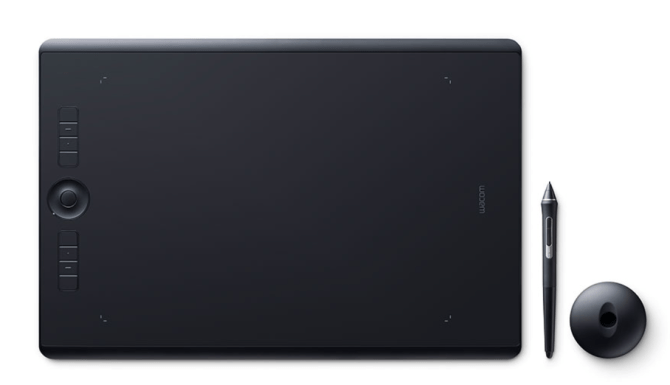
Christchurch City Libraries have two Graphics Tablets available to use at Tūranga.
Talk to our team members if you’d like to borrow one while you are visiting Auahatanga | Creativity, Level 4.
The Graphics Tablet can be borrowed for up to 2 hours for in-library use only.A Graphics Tablet (also known as a pen or drawing tablet) is a device that enables a user to hand-draw images, animations and graphics, with a special pen-like stylus. Our Wacom Intuos Pro Creative Pen tablets can be connected to computers in our Creative Space to use with creative software such as Adobe Photoshop or Affinity Photo.
-
Software available in Computer Lab 1, 4.22 Auahatanga | Creativity, Level 4, Tūranga.
Your library membership gives you access to LinkedIn Learning which has tutorials on some of the following software.
In addition to the software available on all public computers the following software is installed on PCs in Computer Lab 1:
Animation, Effects and 3D Modelling
- Adobe Animate 2D Animation.
- Adobe Character Animator 2D animation with camera-based motion capture and audio. Capable of live animation of characters.
- Adobe After Effects (including Cinema 4D Lite) Layer-based digital effects, compositing and motion graphics.
- Blender 3D modelling, animation and compositing.
- Da Vinci Resolve Fusion (packaged with DaVinci Resolve) Node-based digital effects, compositing and motion graphics.
Audio Recording and Editing
Desktop Publishing and Graphic Design
- Adobe Illustrator Illustration and vector graphics.
- Adobe InDesign Desktop publishing.
- Adobe Lightroom Classic Photo organizer and editor.
- Adobe Photoshop Image composition and editing.
- Affinity Designer
- Affinity Photo
- Affinity Publisher
- Affinity by Canva: requires your own personal Canva login
- Wacom Tablet and Inkspace App – for use with the borrowable Wacom Intuos Pro creative pen tablets
Video Editing
- Adobe Premiere Pro Video editing.
- DaVinci Resolve (the studio version is available in the AV Studio)
Games
- Universe Sandbox: Physics-based space simulator
Other
- Handbrake Audio and video file conversion.
- OBS Studio Screen capture software.
- Musescore – free music composition and notation software
-
Software available on the computers (Macs Studios) in the Audio/Video Studio at Tūranga, Te Hāpua: Halswell Centre, and Pua at Matatiki Hornby Centre.
Your library membership gives you access to LinkedIn Learning which has tutorials on some of the following software.
Animation, effects and 3D modelling
- Adobe Animate 2D Animation
- Adobe Character Animator 2D animation with camera based motion capture and audio. Capable of live animation of characters.
- Adobe After Effects (including Cinema 4D Lite) Layer-based digital effects, compositing and motion graphics.
- Blender 3D modelling, animation and compositing.
- Da Vinci Resolve Fusion (packaged with DaVinci Resolve) Node-based digital effects, compositing and motion graphics.
Audio Recording and Editing
- Ableton Live 11 Suite
- Adobe Audition
- Audacity
- GarageBand
- Logic Pro X
- Vital Digital synthesizer. Audio Plugins: Vital (also works as standalone application); Native Instruments
Desktop Publishing and Graphic Design
- Adobe Illustrator Illustration and vector graphics
- Adobe InDesign Desktop publishing
- Adobe Lightroom Classic Photo organizer and editor
- Adobe Photoshop Image composition and editing
- Krita Digital painting
Video Editing
- Adobe Premiere Pro Video editing.
- DaVinci Resolve Studio
- Final Cut Pro X Video editing.
- iMovie Basic video editing.
Other
- OBS Studio Screen capture software.
- Handbrake Audio and video file conversion.
-
Public use library computers have the following software installed:
Windows
- Windows Accessibility tools including Magnifier: Microsoft screen magnifying software, and Narrator: Microsoft light-duty screen reader utility.
- Pharos Account Balance: View the balance on Pharos account, required for printing & copying.
- Māori keyboard and dictionary
- Multiple keyboard languages supported
Web Browsers
- Microsoft Edge: Web browser
- Firefox: Web browser
- Google Chrome: Web browser
Office
- Microsoft Office: Suite of programmes including word processor, slideshow, spreadsheet and more. (Word, Excel, PowerPoint and OneNote).
Desktop Publishing
- Scribus: Desktop publishing application that can import Microsoft Publisher files.
Other programs include
- Audacity: Audio editing software.
- Inkscape: Drawing programme
- iTunes: Music library software.
- Media Player: for audio and video files
- Microsoft Clipchamp: free video editing tool, requires a personal Microsoft account login
- Notepad++: Text tool
- Paint.net: Drawing programme
- PDF-Xchange: Open, read, create & edit PDF files
- VLC: Multi-format video player.
Available at:
- Affinity Designer: vector graphics editor Adobe Illustrator alternative
- Affinity Photo: raster graphics editor Adobe Photoshop alternative
- Affinity Publisher: desktop publishing application Adobe InDesign alternative
- Affinity by Canva: requires your own personal Canva login
- Blender: 3D computer graphics
- Minecraft Education Edition
- OBS Studio: Desktop video recording and live streaming software
- PrusaSlicer: 3D printing design
- Silhouette: crafting tool
For Adobe Creative Cloud and more specialised software, see also:
Get the latest tech news from the library
Want to get a monthly email with all the latest news about Auahatanga - Creative Spaces? Just subscribe to our newsletters.
Pick Auahatanga - Creative Spaces from our newsletter options under Programs
